
Apple Is Making Liquid Glass Easier to Read
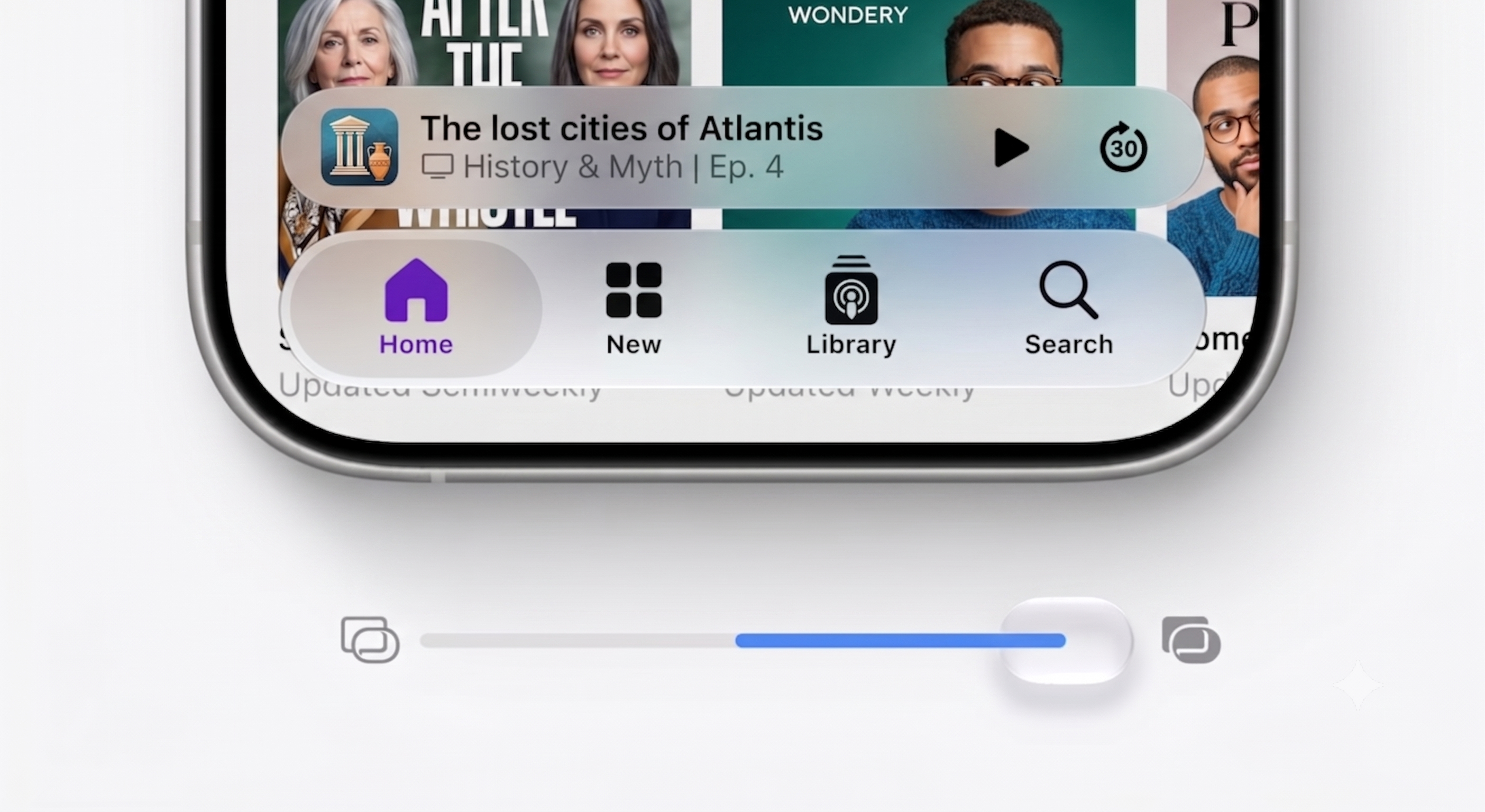
At WWDC 2026, Apple confirmed that it is adjusting the foundations of Liquid Glass to improve readability. The company’s new approach focuses on creating better separation between interface layers, especially when panels appear over busy or detailed backgrounds. This should make buttons, text, menus, and app controls feel clearer without completely removing the visual style that made Liquid Glass stand out.
This change matters because interface design is not just about beauty. A software update can look polished, but if users struggle to read labels or recognize controls, the experience quickly becomes frustrating. Apple’s latest move shows that it is listening to feedback and trying to balance style with usability.
More Control for Users
One of the biggest updates is the addition of a new Liquid Glass adjustment slider. Instead of forcing everyone to use the same level of transparency, Apple will let users choose how strong or subtle the effect should be. The slider will reportedly allow settings from a very clear glass effect to a more tinted look.
This is a smart step for accessibility and personalization. Some users may prefer the futuristic transparent design, while others may want stronger contrast and easier reading. By giving people more control, Apple can keep the design flexible without making it feel like a one-size-fits-all change.
App Icons Are Also Getting Refined
Apple is also updating app icons on iOS and macOS to make them feel more polished and consistent with the Liquid Glass design language. This could help the overall interface feel more unified, especially if icons, widgets, menus, and panels all follow the same visual direction.
For developers, Apple’s announcement is also important. Liquid Glass customizations are expected to work inside apps at launch, which means third-party apps should be able to match the updated system look more naturally. That could lead to a smoother experience across Apple devices.
Why This Update Matters
Apple rarely backs away from major design changes immediately, but it often refines them over time. Liquid Glass appears to be following that same path. The company is keeping the bold visual identity, while making practical changes based on real-world user feedback.
For iPhone, iPad, and Mac users, the update could make everyday tasks easier. Reading messages, browsing menus, switching apps, and using controls may feel more comfortable if the new tint and readability options work well. For Apple, this is also a chance to prove that a modern interface can be both stylish and practical.
Final Thoughts
Apple’s Liquid Glass update is not just a cosmetic tweak. It is a response to user concerns about readability, accessibility, and customization. With improved contrast, adjustable transparency, refined icons, and developer support, Liquid Glass may become a more user-friendly design system across iOS and macOS.
If Apple gets the balance right, Liquid Glass could evolve from a controversial redesign into one of the company’s most recognizable interface updates in years.